
LANDR - Master & Release Music
LANDR AudioMusic & Audio
4.6205.00 Reviews
- Version
- 2.15.5
- Installs
- 100.00K
- Age Rating
- Everyone
Screenshots
Our Review of LANDR - Master & Release Music
 Analysis by Appyee
Making music on a phone is easy to start and surprisingly difficult to finish well. Recording a rough idea, checking a mix, preparing a release, and sharing a track are different jobs, and they often happen in different places. LANDR - Master & Release Music is built around bringing several of those jobs into one mobile music and audio workspace. I see it as a practical companion for independent artists who want to move a song forward while away from a full studio, rather than as a replacement for every part of a desktop production setup.
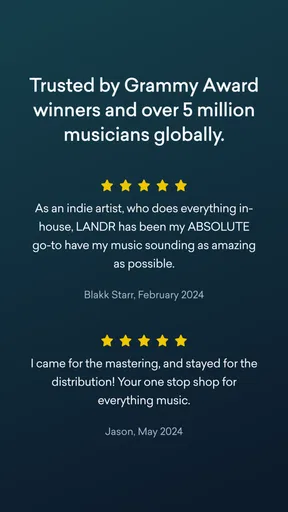
The app comes from LANDR Audio and is available as a free app for Android users. It sits in the Music & Audio category, carries an Everyone age rating, and has reached over 100 thousand installs. Its average rating is 4.6 from around 3.7 thousand ratings, which suggests that many users find the general workflow useful, although a store score cannot tell you whether it fits your particular release process.
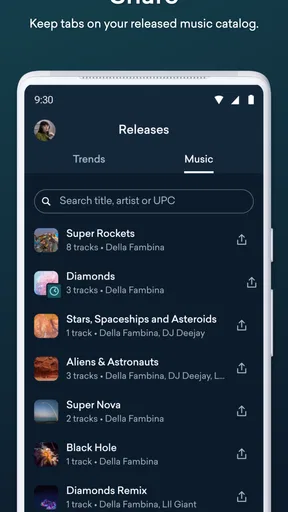
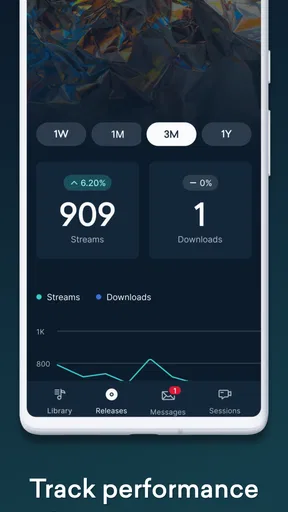
What makes this app interesting is the way it connects finishing tasks. The emphasis is not simply on listening to songs or making quick beats. It is aimed at people who need to master, distribute, and share their own audio, sometimes between studio sessions and sometimes entirely from a mobile device. That focus gives it a clearer purpose than a general music-making app, but it also means that users expecting a deep multitrack workstation may be looking in the wrong place.
How the connected workflow feels in everyday use
The first thing I noticed is that an app centered on mastering and releasing music depends heavily on communication with online services. A song has to move between your device and the service handling the relevant processing or delivery step, so a stable connection becomes part of the experience rather than a minor convenience. On a strong home or studio network, that relationship feels sensible: I can prepare a track, send it through the next stage, and continue reviewing it without switching between several unrelated tools.
On a weak connection, the same workflow feels less predictable. Uploading audio is more demanding than opening a text note or browsing a playlist, especially when the source file is large. A progress screen that pauses can leave you wondering whether the task is still active or needs to be started again. For that reason, I would begin important uploads before a deadline and avoid treating a mobile signal as guaranteed simply because other apps appear to work normally.
This is one of the app’s strongest practical lessons: the quality of the experience depends on planning around the network. If I am only checking a project or thinking through a release, a phone is convenient. If I am sending a final master or preparing several assets, I want a reliable Wi-Fi connection, enough battery, and time to verify the result rather than rushing through the process on the way to an event.
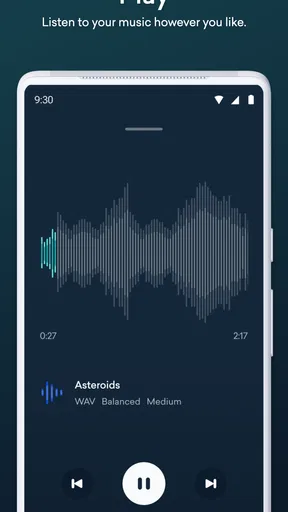
The connected design also affects how I think about mobile music work. A phone is excellent for keeping momentum. I can listen to a bounce during a commute, check whether a chorus still feels balanced after leaving the studio, or share a version with someone who is not sitting beside me. It is less comfortable for long, highly detailed editing sessions where I need precise control over every element of a mix.
Useful mobile situations, and where the screen gets in the way
I found the app most convincing as a bridge between creative moments. Imagine finishing a vocal take at home, exporting a mix from a desktop setup, and then realizing that you want to hear how the track translates outside your monitors. A phone-based workflow lets you carry that review stage with you. On headphones, in a car, or through ordinary small speakers, I can make notes about the low end, vocal position, or overall loudness before returning to the main project.
That does not mean a phone should become the only place where decisions are made. Small screens encourage quick judgments, and quick judgments can miss problems that become obvious during a longer, more focused session. I would use the app to organize the next action and evaluate how a finished or nearly finished track travels, while keeping detailed arrangement and mix surgery in a tool designed for that level of control.
Another useful scenario is the independent artist who handles several roles alone. Instead of waiting until sitting at a computer to think about distribution, I can use a mobile workflow to keep release preparation moving. This is especially helpful when a song is already mixed and the remaining work is administrative or delivery-focused. The app’s value is therefore greater after the creative core is finished than during the earliest stages of writing.
There is a trade-off here. Combining mastering, distribution, and sharing in one place reduces the number of handoffs, but it also makes the app feel more process-oriented than experimental. If I want to sketch melodies, build a complex arrangement, or manipulate individual tracks with the depth of a digital audio workstation, I would choose a dedicated production app instead. LANDR Audio’s product makes more sense when the question is “How do I move this song toward release?” rather than “How do I compose the entire song from nothing?”
What happens when connectivity or a task goes wrong
Any workflow that sends audio between a phone and an online service needs a calm recovery habit. My advice is simple: do not assume that a stalled screen means the music itself is lost, and do not immediately repeat a large upload several times. First, check whether the project or task appears to have changed state, then confirm the connection before trying again. This avoids creating confusion and saves mobile data when the network is the real problem.
I would also keep a clearly named local copy of the mix before beginning a mastering or release task. That is not a special feature claim about the app; it is a sensible safeguard for any mobile audio workflow. A version such as “artist-title-final-mix” is much easier to identify than a collection of exports with vague names. If I need to retry a transfer, I know exactly which file I intended to send.
Recovery is also easier when I separate review from approval. I might upload a mix, listen carefully, and decide that the vocal needs another adjustment. In that case, I would return to the source project instead of treating the first processed result as final. This is a subtle but important distinction: a convenient mastering step cannot repair every creative decision in the mix, and repeatedly processing the wrong version only makes the release path harder to track.
For release work, I prefer a checklist outside the app as well. I would note the chosen master, artwork status, artist name, track title, and intended destination before confirming anything important. A mobile interface can make a complicated process feel short, but the consequences of a wrong file or inconsistent metadata can last much longer than the upload itself.
The app is therefore best approached as a tool that helps complete a workflow, not as a magic safety net. It can reduce friction between audio preparation and sharing, but the user still needs version control and patience when a connection drops or a file needs replacing. That balance is important for newcomers who may assume that a polished interface removes the need for careful release habits.
Using it without wasting mobile data
Audio files can consume more data than everyday app activity, so I would reserve major uploads for a trusted Wi-Fi connection whenever possible. This is particularly relevant if I am sending an uncompressed mix or working with several versions. Mobile data is better saved for light checks, messages, or urgent sharing rather than used automatically for every transfer.
A practical routine is to prepare everything before connecting: finish the mix export, give the file a meaningful name, close unrelated apps, and decide which version is actually needed. That reduces the chance of uploading an unnecessary draft. It also makes a weak connection less frustrating because I am not repeatedly sending files simply because I forgot which one was current.
Battery matters too. Network activity and audio playback can drain a phone faster than a short text session, and a failed task halfway through a transfer is inconvenient. When I am working away from a charger, I would keep the session focused: review the track, write down changes, and postpone large delivery steps until I can connect to power and a stable network.
There is another data-conscious choice that affects sound quality. I would not judge a final master only through a compressed preview or a single pair of earbuds. A quick mobile check is useful for translation, but it should complement a proper listen to the source and completed files. The phone is a valuable reference point, not an excuse to ignore the original audio or the listening environments that matter to the audience.
Users should also remember that the free download does not necessarily mean every part of the wider workflow is free. The app is listed as free, while in-app purchases range from around six dollars to around 69 dollars per item. I would inspect the particular step and pricing shown in the app before committing to a paid action, especially if I am testing the service for the first time. This is not a reason to avoid it, but it is a reason to treat release budgeting as part of the decision.
Who will get the most from this app
I would recommend it to an independent musician who already has finished or nearly finished mixes and wants a more direct path to mastering, distribution, and sharing. It is also a good fit for artists who move between a home setup, rehearsal space, and everyday travel, because the phone can keep release tasks visible instead of leaving them until the next desktop session.
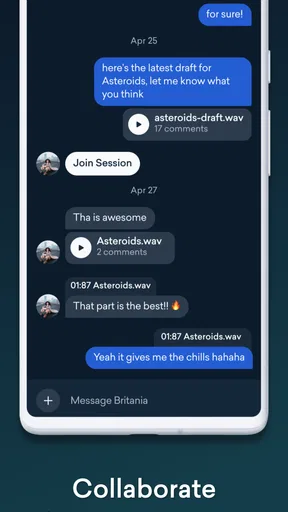
It may suit a small team as well, particularly when one person is producing and another needs to hear a version remotely. Sharing a track from the same general workflow can be more convenient than exporting, renaming, uploading to a separate service, and explaining which file is current. The benefit is not just fewer taps; it is fewer opportunities for two people to discuss different versions by mistake.
I would be more cautious if you are a beginner who has not yet learned the difference between mixing and mastering. The app can help with the finishing path, but it cannot replace learning why a vocal is buried, why a bass masks the kick, or why a recording sounds harsh. If the source mix needs major creative repair, I would fix that first in a suitable production environment.
I would also skip it as my primary tool if I need detailed MIDI editing, extensive sound design, deep automation, or a full arrangement timeline. A mobile release companion and a complete workstation solve different problems. Choosing the wrong one can make the app feel limited even when it is doing exactly what it was designed to do.
How it compares with familiar alternatives
The usual alternative is a desktop digital audio workstation combined with separate mastering, file-transfer, and distribution services. That route offers more control and often makes detailed editing easier, but it can scatter the release process across several places. LANDR Audio’s approach is appealing when convenience and continuity matter more than having every technical control in one screen.
Another alternative is a mobile recording or beat-making app. Those tools are often better for starting ideas, capturing performances, or building arrangements directly on a phone. This app is more specialized toward getting an existing piece ready to move outward. If your main need is creation, a production-focused mobile app may be the better first download; if your main need is finishing and releasing, this one has a clearer advantage.
Dedicated distribution services can also be preferable for artists who already have a mastering routine and only need delivery to platforms. In that situation, paying for or learning another mastering workflow may add unnecessary complexity. The value here comes from combining related stages, so the more of those stages you genuinely plan to use, the more reasonable the app becomes.
The current version is 2.15.5 and it requires Android 10 or later. That makes checking device compatibility an important first step before planning a mobile release session. I also like that the age rating is Everyone, since the audience for an audio workflow can include younger learners as well as established independent artists, though supervision and sensible account decisions still matter for any service involving purchases or publishing.
My final view on connectivity and the overall fit
After using it as a mobile finishing tool, I see LANDR - Master & Release Music as most useful when it removes distance from the release process. It lets me think about a track beyond the studio, review it in ordinary listening situations, and keep mastering, distribution, and sharing closer together than a collection of disconnected tools. That is a meaningful advantage for artists who work in short sessions or need to collaborate without being in the same room.
Its main weakness is inseparable from that strength: the workflow is tied to connectivity, file preparation, and careful timing. A poor signal, low battery, unclear version names, or an unexpected purchase step can interrupt the sense of simplicity. I would not rely on it as the only place where important masters exist, and I would not use it to replace a full production environment.
Still, for the right user, the balance is convincing. The free app gives artists a way to explore the workflow, while the available in-app purchases mean that serious use should be planned rather than treated as entirely cost-free. With Android 10 or newer, a stable connection, organized source files, and realistic expectations about mobile editing, it can become a useful link between making a song and actually putting it in front of listeners.
My recommendation is straightforward: try it if your mixes are already close to finished and your biggest problem is moving them through the final stages. Keep a local master copy, use Wi-Fi for substantial transfers, check every version before approval, and listen outside the studio before calling a track done. If you need deep composition and mixing controls, choose a dedicated workstation instead. If you need a connected route from finished audio toward mastering, release, and sharing, this app is a focused and sensible option.
Verdict
Strengths of LANDR - Master & Release Music
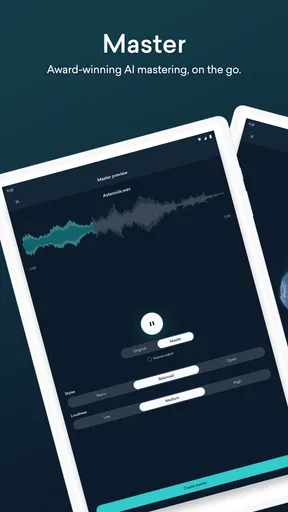
- AI mastering delivers polished results quickly, even for beginners.
- Supports WAV, MP3, and other common audio formats.
- Direct distribution helps release music across major streaming platforms.
- Cloud-based workflow lets you access projects from different devices.
- Includes tools for collaboration, revisions, and sharing with other artists.
Limitations of LANDR - Master & Release Music
- Mastering quality can vary depending on the mix and genre.
- Advanced controls may feel limited for experienced mastering engineers.
- Distribution and subscription features can become costly over time.
- Uploading large, high-resolution files may require a stable connection.
- Some features and processing options are restricted to paid plans.
Similar Picks in This Category
View All
YouTube Music
Google LLC4.4

Samsung Music
Samsung Electronics Co., Ltd.3.8

Spotify: Music and Podcasts
Spotify AB4.3

JioSaavn - Music & Podcasts
Saavn Media Limited4.3

Lark Player:Music Player & MP3
Lark Player Studio - Music, MP3 & Video Player4.6

StarMaker: Sing Karaoke Songs
SKYWORK AI PTE. LTD.4.3
Frequently Asked Questions
What is LANDR - Master & Release Music used for?
LANDR is an online music-production platform and mobile app designed to help artists polish and distribute their songs. Its main features include AI-assisted mastering, music distribution, sample and plugin resources, and tools for managing releases. It is aimed at independent musicians who want to prepare tracks for streaming services without relying entirely on a traditional studio or record label.
Does LANDR automatically master songs, and can I control the result?
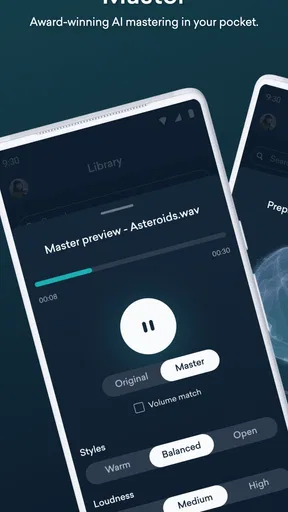
Yes. LANDR analyzes an uploaded track and creates a mastered version using automated processing intended to improve loudness, balance, clarity, and overall consistency. The result can usually be previewed before downloading or releasing it, and available controls may let you compare variations or adjust the intensity and tonal direction. However, automated mastering is not a replacement for careful mixing or professional engineering in every situation.
Can I distribute music to Spotify, Apple Music, and other platforms with LANDR?
LANDR offers music-distribution services that can help independent artists deliver releases to major streaming and download platforms, including services such as Spotify and Apple Music, depending on the current plan and regional availability. Before submitting a release, you should check the required artwork, metadata, audio, copyright, and artist-information rules. Release timing and store approval are not always immediate.
Is LANDR free to use, or does it require a subscription or payment?
LANDR provides some features with limited access, but important tools may depend on a paid subscription, credits, or separate release fees. The exact pricing structure can vary according to the selected plan, mastering options, distribution terms, sample access, and promotional offers. It is worth reviewing the checkout details carefully, especially for renewal conditions, included downloads, and whether distribution payments are recurring or per release.
Is LANDR suitable for beginners, and what should I prepare before using it?
LANDR is generally approachable for beginners because the interface simplifies tasks such as uploading music, previewing a master, and preparing a digital release. Nevertheless, users should understand basic concepts such as file formats, headroom, metadata, cover-art specifications, and ownership rights. For the best results, upload a properly mixed, high-quality file and confirm that you control all samples, compositions, recordings, and artwork included in the release.
